A home for change approvals, without Jira
Change management needs a place to record each change approval: who was asked to decide it, what they decided and when. Many companies keep that in Jira. Others have no Jira, or would rather keep change approvals next to the merge requests they cover than in a tool set up for other work.
The built-in tracker is that place inside Merge Pilot. It is connected like any other tracker, so change policies, assignment and the merge gate work as they do with Jira, and a decision made on its board is known at once, because the issue lives in Merge Pilot.
What it covers
With a MergePilot Tracker connection, change approvals are created and decided inside Merge Pilot, under the same change policies as with Jira, with no URL, credentials or webhook to set up.
Board and list
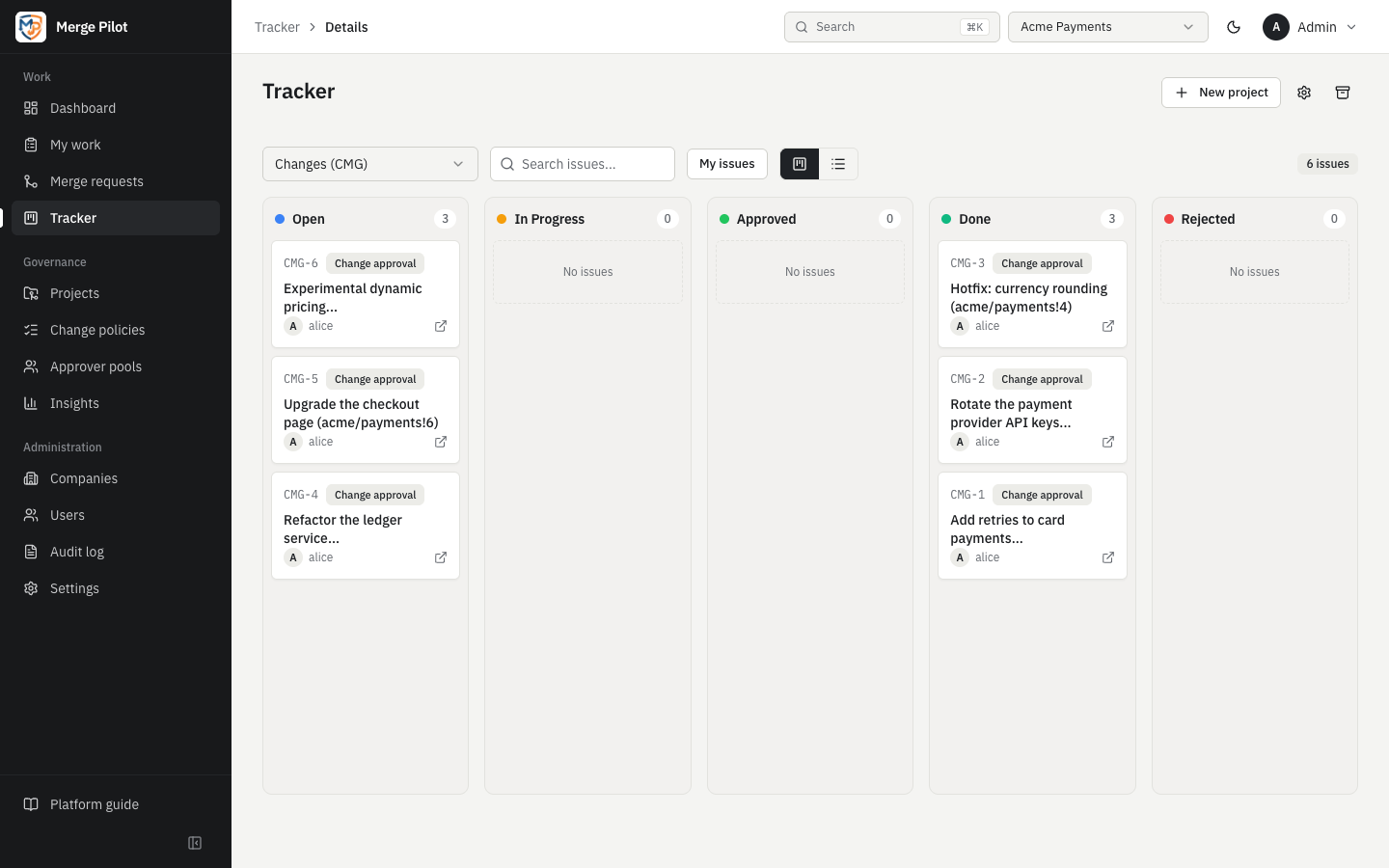
Columns per workflow state with drag and drop, or a filtered list; a My issues toggle on both.
Read the docsWorkflows
States, allowed transitions, closing states (an approving vote) and rejection states (a rejecting vote).
Read the docsCustom fields
Text, options, numbers, dates, users and yes/no fields, required when created or before a state.
Read the docsStricter by design
Only the assignee moves a change approval to an approving or rejecting state, never the change's author, and only they tick the review check boxes the decision rests on.
Read the docsTasks as work items
Manual-mode projects hold ordinary tasks. A merge request that mentions a task's key, such as PAY-12, is linked to it, and under an enforced Work items control cannot merge until it names one that exists.
Read the docsHow it works
Connect it
A company admin adds a tracker connection with MergePilot Tracker as the provider and picks a tracker project in VCS mode, or creates one in the same dialog with Create tracker project. There is no URL, no credentials and no webhook to set up.
Read the docsLink it to the repositories
The VCS connection's Linked tracker connection names it, so the change approvals of that connection's merge requests are opened in it.
Read the docsA change approval is opened
When a merge request needs one, Merge Pilot creates an issue in the project's first state (Open by default), with the summary and description from the tracker settings' templates, a link to the merge request and the commit it covers, and an assignee who may decide it.
Read the docsThe assignee decides
Moving the issue into an approving state (Approved or Done by default) approves the change; moving it into a rejecting state (Rejected) rejects it. Only the assignee may make these moves, never the merge request's author, and only after linking their account on the merge request's VCS in My profile.
Read the docsThe policy counts the decision
Merge Pilot counts the move under the change policy's rules. When more approvals are needed, it records this one and moves the issue back to the Reopen status for the next approver; when they are met, the change approval is approved and the merge gate updated. A decision that does not count is undone.
Read the docsIt follows the merge request
A merge or a closed merge request moves the issue to the Merged status or the Cancelled status, when the tracker settings name them. A change approval decided by votes in Merge Pilot moves to the matching approving or rejecting state.
Read the docs
Example: one change approval on the board
A merge request in acme/payments targets main, and its change policy needs a change approval. The company's change approvals go to the tracker project with the prefix CHG.
- Merge Pilot opens
CHG-12in Open, as a Change approval, with a link to the merge request and its head commit, and assigns it to an approver the policy allows. - The approver turns on My issues on the board and finds the card in the Open column. The link icon on the card opens the merge request on the VCS.
- They drag the card to Approved. A new VCS-mode project requires its six review check boxes before Approved, so the Required fields dialog asks for them first; the approver ticks the reviews and confirms the move.
- Merge Pilot counts the approval. With the policy's approvals met, the change approval is approved and the merge gate updated: the merge request can merge once its other checks have passed too.
- Had the author of the merge request tried the same move, it would have been refused: only the assignee may decide, and never the author.
- If another commit is pushed, it needs a decision of its own: depending on the policy, a fresh change approval is opened or
CHG-12goes back to the Reopen status. - When the merge request merges,
CHG-12moves to the Merged status, if one is set, and Time in states on the issue page shows how long it spent in each state.
See it on your own repositories
Ask for a demo on your own GitLab or GitHub repositories.