Numbers you can trace back to the decision
Change management is asked two kinds of question: how is delivery going, and what exactly happened to a given change. When the answers come from different tools, someone has to reconcile them, and an auditor is handed a spreadsheet put together afterwards.
Merge Pilot answers both from the record it keeps while it gates: each merge request's policy and policy version, decision, scans, votes and merge, and the audit log of who did what. The dashboard, DORA metrics, the change calendar, My work and the compliance report all read that record.
What it covers
Everything Merge Pilot decides is recorded, so the numbers come from the same source as the gate.
DORA metrics
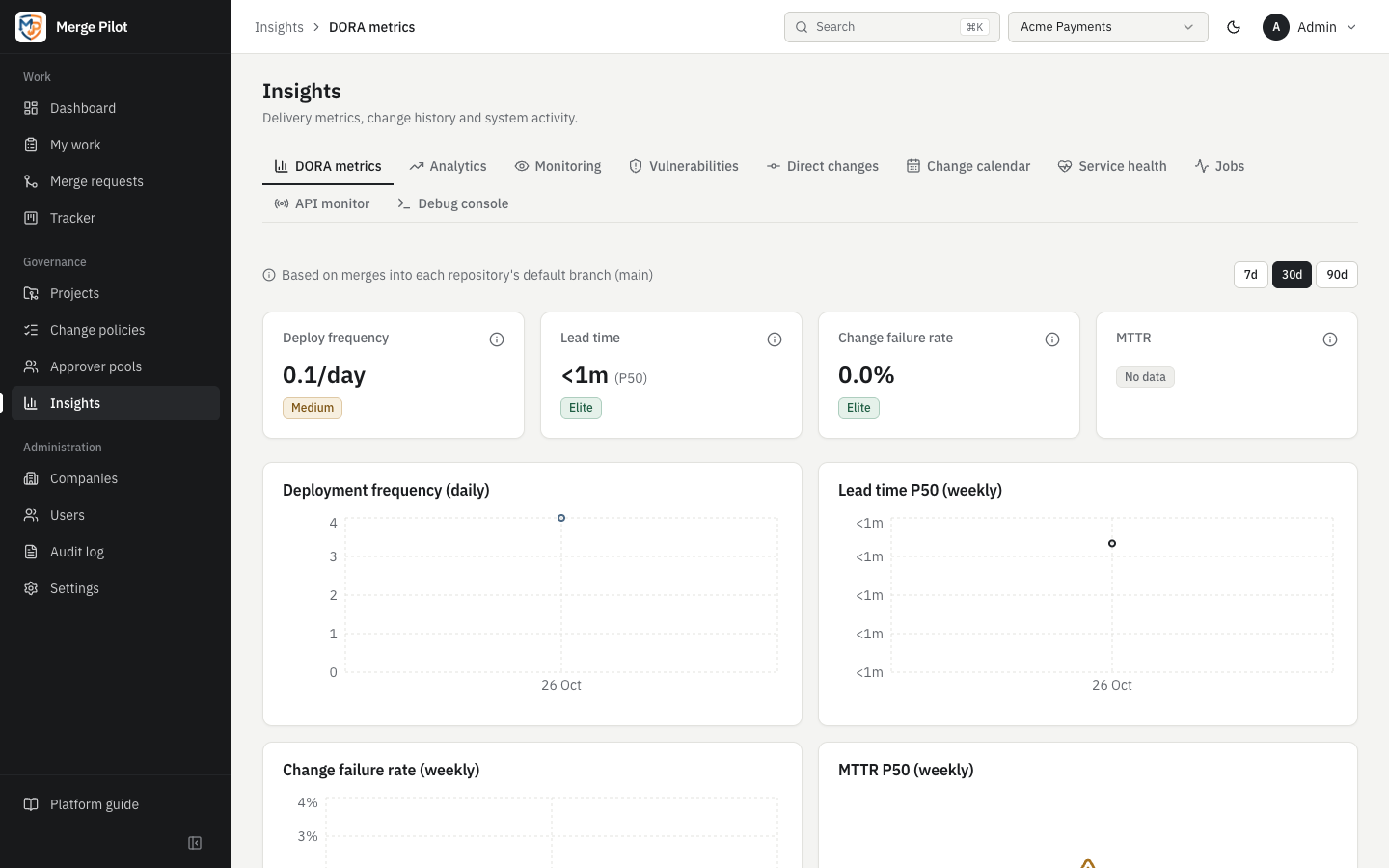
Deployment frequency, lead time for changes, change failure rate and time to restore, counted from merges into each repository's default branch and rated elite, high, medium or low (or no data), with a per-project table.
Read the docsChange calendar
A monthly calendar of merges with change windows, freezes, high-risk merges and merge collisions.
Read the docsMy work
Each person's merge requests that need them, with what holds each one, and the change approvals waiting for their decision.
Read the docsCompliance report
For a period: the merge requests under change management (up to 10,000 in CSV or 2,000 in PDF) with their policy, decision, approval, scans and merge, the changes that skipped it, and the audit trail, as CSV or PDF.
Read the docsAudit log
Decisions, votes, setting changes and sign-ins are recorded with who, when and what changed, and can be filtered.
Read the docsHow it works
Every decision is recorded
Decisions, votes, merges, setting changes and sign-ins are written to the audit log as they happen, with who, when and what changed; actions Merge Pilot takes by itself show as merge-pilot. Entries cannot be edited or deleted, from the page or the API.
Read the docsStart from what is waiting
The dashboard opens with Needs attention: the open merge requests that cannot move until someone acts, those stopped first, then those on a hold, then those waiting on a person.
Read the docsEach person's queue
My work lists the merge requests a person wrote that something holds, with the reason (such as CI failed, Risk hold or Change approval rejected), and the change approvals waiting for their decision.
Read the docsDelivery over time
DORA metrics treat a merge into a repository's default branch as a deployment and a pipeline that failed after the merge as a failed change, over 7, 30 or 90 days. Risk insights compare the failure rate of high-risk merges with low-risk ones and count merges outside change windows or during freezes.
Read the docsWhen changes landed
The change calendar shows, month by month in the company's time zone, the days with change windows and freezes, how many merges landed and how many were high-risk, and collisions: several merges into one branch in the same two-hour slot, at least one of them high-risk or in a freeze.
Read the docsEvidence for an audit
Audit log → Export report downloads, for a period, the merge requests under change management with their policy, decision, approval, scans and merge, the changes that skipped change management, and the audit trail, as CSV or PDF.
Read the docs
Example: evidence for one quarter of acme/payments
An auditor asks for evidence that the changes merged into acme/payments last quarter were approved under policy.
- Someone with the auditor role signs in. Auditors read the audit log and export the report, and change nothing.
- Under Audit log → Export report they set From and To to the quarter, keep Changes on Merged in the period, choose CSV and download.
- Each row of the merge request evidence names the Policy and Policy Version, the Change Type and the Gate, and sets the Approved Commit beside the Merged Commit, with Merged Commit Approved saying whether they are the same.
- Votes lists each vote with who cast it and where; Secret Scan and Dependency Scan give the scans' results; Merged Without Approval and Merged In Freeze flag the rows to look at first.
- The changes outside change management part lists any push that reached a branch of a repository under change management without a merge request, with who pushed it and how it was found.
- For an entry that needs context, the audit log is filtered by action, user, resource and date; a settings change shows what changed field by field, with secrets masked.
- Had the quarter held more than one file allows, the page would have said Report truncated and named the part cut; a shorter period covers the rest.
See it on your own repositories
Ask for a demo on your own GitLab or GitHub repositories.